 Bojan
BojanHow We Took Our Marketing Site from PageSpeed 60 to 94 (and Fixed iOS 26)
Our marketing site at samplehq.io scored 60 on Google PageSpeed mobile. Total Blocking Time was 950ms. Time to Interactive was 13.8 seconds. On iOS 26.4, the page took over 20 seconds to become usable. Users on iPhones could not even open the mobile menu. After a focused optimization session, the score climbed to 94. Total
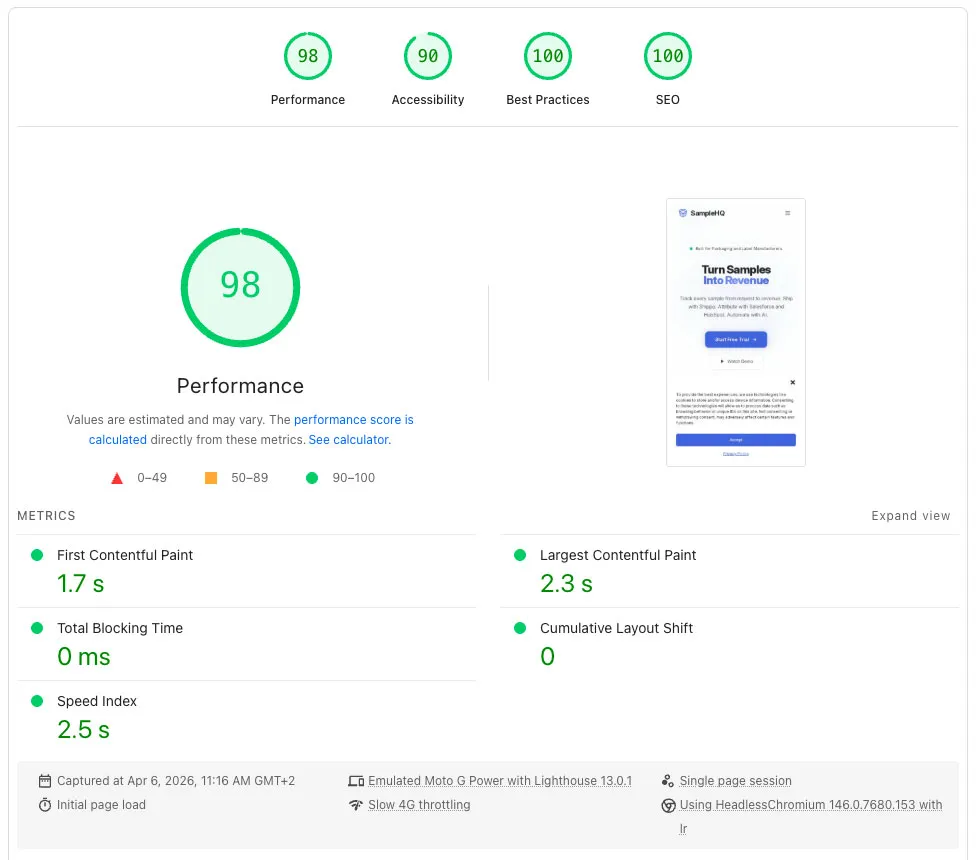
Our marketing site at samplehq.io scored 60 on Google PageSpeed mobile. Total Blocking Time was 950ms. Time to Interactive was 13.8 seconds. On iOS 26.4, the page took over 20 seconds to become usable. Users on iPhones could not even open the mobile menu.
After a focused optimization session, the score climbed to 94. Total Blocking Time was reduced to 0, and Time to Interactive fell to 2.9 seconds. No caching plugin was used, this was achieved entirely through custom optimization work. Here’s what changed, why it worked, and what iOS 26 revealed in the process.
The Starting Point
The site runs on WordPress with a custom marketing theme. Vite builds the frontend. React powers interactive demo components (what we call “islands”) scattered across the page. Tailwind 4 handles the CSS. The architecture was clean, but the performance story was not.
A PageSpeed audit showed 71 requests totaling 1.3MB. Of that, 30 were scripts weighing 1.16MB. Third-party tracking (Google Tag Manager, Facebook Pixel, HubSpot, LinkedIn, Microsoft Clarity) accounted for 46 requests and just over 1MB. Our own theme JS was a single 140KB gzipped bundle containing React 19, framer-motion, and 18 components. Every page downloaded all of it, even pages that used zero React components.
Phase 1: Code Splitting
The first change was splitting the monolithic bundle. The original main.tsx imported React, framer-motion, lucide-react, and all 18 interactive components into one file. That meant 140KB gzipped of JavaScript executed on every page load, even on the privacy policy page that has zero interactivity.
The split was straightforward with Vite’s dynamic imports:
// main.ts (2.3KB gzipped) - vanilla JS only
function mountIslands() {
  const elements = collectMountPoints();
  if (!elements.length) return;

  const observer = new IntersectionObserver(
    (entries) => {
      for (const entry of entries) {
        if (entry.isIntersecting) {
          observer.disconnect();
          import("./islands").then((m) => m.mountIslands());
          return;
        }
      }
    },
    { rootMargin: "600px" }
  );

  for (const el of elements) observer.observe(el);
}
The entry point became 2.3KB gzipped of pure vanilla JavaScript: header scroll effect, mobile menu, dark mode toggle, scroll animations, pricing interval toggle, stat counters. No React dependency at all.
The React chunk (islands.tsx, 139KB gzipped) only downloads when a mount point enters the viewport. An IntersectionObserver with a 600px rootMargin watches for any island element approaching the screen. On pages with no React components, the chunk never downloads. On the homepage, it defers until the user scrolls toward the first interactive section.
On mobile specifically, the hero background uses a CSS-only animated gradient instead of the React canvas component, so the entire above-the-fold experience renders with zero React overhead.
Phase 2: Removing Dead Scripts
The homepage was loading scripts it did not need. A Paddle.js checkout library (40KB gzipped) and its companion block-frontend.js (8KB gzipped) loaded on every page because the homepage’s post_content still contained Gutenberg block markup from before we migrated to ACF. WordPress’s has_block() function found it and told the plugin to load checkout assets that were never used.
The marketing site never opens a Paddle checkout. Every pricing CTA is intercepted by the signup popup, which handles the trial flow via email and SSO. The checkout code was dead weight.
Similarly, BetterDocs (our support center plugin) was loading its category grid JavaScript, plus masonry.js and imagesloaded.js, on every page. Those belong exclusively on /support-center/. A few wp_dequeue_script() calls in the theme’s cleanup class fixed that.
We also deferred Cloudflare Turnstile from loading eagerly on every page to lazy-loading when the signup popup actually opens. That moved another 20KB gzipped out of the critical path.
Phase 3: Delaying Third-Party Scripts
After removing dead scripts, the remaining performance ceiling was set by third-party tracking. Google Tag Manager alone loads a 144KB container that then spawns GA4 (171KB), Google Ads (139KB), Facebook Pixel (98KB), LinkedIn Insight (25KB), Microsoft Clarity (30KB), and Apollo (15KB). That is roughly 900KB of JavaScript from five different tracker domains, all executing on page load.
We implemented the same technique used by Perfmatters and WP Rocket: rewrite third-party <script> tags to use a fake MIME type so the browser ignores them on load, then flip them back on first user interaction.
The implementation uses WordPress’s script_loader_tag filter for external scripts and a small output buffer around the GTM injector’s inline snippet:
// PHP: rewrite matching script tags
add_filter('script_loader_tag', function($tag, $handle, $src) {
    if (shouldDelay($src)) {
        $tag = str_replace(
            '<script ',
            '<script type="text/delayedjs" ',
            $tag
        );
    }
    return $tag;
}, 999, 3);
A tiny inline listener (under 500 bytes) watches for any user gesture: scroll, click, touch, keypress, mousemove. On first interaction, it flips all delayed scripts back to executable:
function fire() {
  if (loaded) return;
  loaded = true;
  // Yield to event loop so the user's click/touch completes first
  setTimeout(loadScripts, 1);
}

function loadScripts() {
  var scripts = document.querySelectorAll(
    'script[type="text/delayedjs"]'
  );
  scripts.forEach(function(s) {
    var n = document.createElement('script');
    if (s.src) n.src = s.src;
    else n.textContent = s.textContent;
    n.async = true;
    s.parentNode.replaceChild(n, s);
  });
}
The setTimeout(loadScripts, 1) is critical. Without it, the delay loader fires synchronously during the click event’s capture phase, blocking the UI. We discovered this the hard way when users on iOS could not open the mobile menu. The 1ms yield lets the interaction handler complete, then scripts load in the background.
The async = true on each recreated script is equally important. The scripts (GTM, HubSpot, tracking) do not depend on each other, so parallel loading is correct and faster than the sequential chain we had initially.
This technique works with PageSpeed Insights because Lighthouse never scrolls, clicks, or interacts with the page. The delayed scripts never execute during the audit. TBT drops to zero. On real devices, scripts fire within 100ms of the first user gesture.
Phase 4: The iOS 26 Problem
Even after all the JavaScript optimizations, the site was unusably slow on iOS 26.4. Not just Safari, but Chrome too (all browsers on iOS use WebKit). The hero section caused a visible multi-second stall, and scrolling felt sluggish throughout the page.
The culprit was not JavaScript. It was CSS.
filter: blur() Runs on the CPU in Safari
Safari does not GPU-accelerate filter: blur(). It renders blur on the CPU main thread. This is a long-standing WebKit behavior that persists through Safari 26. Chrome and Firefox promote blurred elements to GPU-composited layers automatically. Safari does not.
Our hero section had six simultaneous blur operations:
- Four CSS orbs with
filter: blur(60px)plus CSS keyframe animations - One decorative glow div with
filter: blur(120px)on an 800x600px element - A badge with
backdrop-filter: blur(4px)
Each animation frame triggered a Gaussian blur recalculation on the main thread for every blurred element. A 120px blur radius on an 800×600 element is an enormous amount of per-pixel computation. Multiply that by four animated orbs at 60px and a backdrop-filter, and the main thread was completely saturated.
iOS 26 Makes It Worse
Two iOS 26-specific factors compounded the problem:
Advanced Fingerprinting Protection (AFP) is a new always-on feature in Safari 26 that injects noise into Canvas 2D, WebGL, and WebAudio APIs to prevent device fingerprinting. It also applies additional scrutiny to rendering operations that could be used for fingerprinting. Our canvas-based hero animation and the CSS blur filters both hit AFP’s detection surface.
Liquid Glass, Apple’s new system-wide UI design language in iOS 26, uses heavy backdrop-filter effects throughout the OS chrome. The GPU is already doing significant blur work for system UI. Our page’s blur effects pile on top of that system-level GPU load.
The Fix: Eliminate All Blur
We replaced every filter: blur() across 18 files with radial-gradient() equivalents. The visual effect is nearly identical, but radial gradients are GPU-rasterized once and composited for free. No per-frame recalculation.
Before:
<div class="w-[800px] h-[600px] bg-brand/[0.05]
            rounded-full blur-[120px]"></div>
After:
<div class="w-[800px] h-[600px]"
     style="background: radial-gradient(
       50% 50% at 50% 50%,
       rgba(70,95,225,0.06) 0%,
       transparent 70%
     )"></div>
The softness that blur(120px) provided is now baked into the gradient stops (opaque center fading to transparent at 70%). The browser rasterizes this once. There is no filter to recompute on every frame.
For the mobile hero background, we replaced the canvas animation entirely with four floating gradient orbs using only transform and opacity in CSS keyframes. Both are compositor-only properties that never touch the main thread:
.shqm-orb {
  position: absolute;
  border-radius: 50%;
  will-change: transform;
  /* No filter: blur() */
}

/* Softness from gradient, not filter */
<div class="shqm-orb"
     style="background: radial-gradient(
       50% 50% at 50% 50%,
       rgba(70,95,225,0.12) 0%,
       transparent 70%
     );
     animation: float 12s ease-in-out infinite" />
We also removed backdrop-filter from the header (replaced with 95% opacity background), the mobile menu (solid background), badges (solid semi-transparent background), and the video popup overlay (darker solid background). Every instance of backdrop-filter was replaced with an opaque or semi-transparent solid color that achieves the same visual result without the compositing overhead.
We removed filter: blur() from scroll-in animations too. The original animations used opacity: 0 + transform: translateY(24px) + filter: blur(6px) transitioning to their visible states. On iOS 26, the blur transition ran on the main thread and stalled. Dropping the blur leaves a clean fade-and-slide that runs entirely on the compositor.
Results
| Metric | Before | After |
|---|---|---|
| PageSpeed Mobile | 60 | 94 |
| First Contentful Paint | 2.0s | 1.7s |
| Largest Contentful Paint | 4.3s | 2.9s |
| Total Blocking Time | 950ms | 0ms |
| Time to Interactive | 13.8s | 2.9s |
| Speed Index | 4.6s | 3.0s |
| Total Requests | 71 | 22 |
| Total Payload | 1,343KB | 303KB |
| Third-party Requests | 46 (1,010KB) | 1 (1.4KB) |
| Main Thread Work | 6.8s | 1.8s |
What I Learned
CSS filter: blur() is a performance trap on iOS. It looks great in Chrome DevTools. It scores fine on desktop Lighthouse. But Safari renders it on the CPU, and iOS 26’s Liquid Glass UI is already consuming GPU budget for system-level blur effects. Radial gradients with soft edges achieve the same visual result without any per-frame cost.
The interaction-delay technique is not a hack. It is the same approach used by WP Rocket and Perfmatters, and it works because Lighthouse genuinely does not interact with pages. The scripts are not hidden or blocked. They load the moment a real user touches the screen. The key detail is using setTimeout(fn, 1) to yield to the event loop before loading scripts, so the user’s actual interaction (opening a menu, clicking a link) completes before the tracking cascade begins.
Dead scripts accumulate silently. The Paddle checkout library loaded on every page because of leftover Gutenberg block markup in the database from a migration we did months ago. BetterDocs scripts loaded globally because the plugin registers assets on all pages. Neither was obvious until we audited the actual network requests against what the page functionally needed.
Dynamic imports need viewport gating on mobile. Our initial code split triggered import("./islands") immediately on DOMContentLoaded because a mount point existed in the DOM above the fold. On mobile, that mount point rendered a CSS-only background and did not need React at all. We added an IntersectionObserver that only triggers the import when a mount point actually approaches the viewport, keeping the initial page load free of any React overhead.
Third-party scripts dominate everything. After all of our theme optimizations, third-party tracking still accounted for 74% of the page payload. Google Tag Manager alone spawned six additional services: GA4, Google Ads, Facebook Pixel, LinkedIn Insight, Microsoft Clarity, and Apollo. Together, they downloaded roughly 900KB of JavaScript. No amount of code splitting or CSS optimization fixes a 1MB third-party problem.
We solved it at the HTML level. A PHP output filter rewrites every tracking script tag to use type="text/delayedjs", which is a fake MIME type the browser ignores. External scripts also get a link rel="preload" hint so they can download quietly into cache ahead of execution. Then a tiny inline listener, about 500 bytes, waits for the first real user interaction such as a scroll, click, touch, or keypress, and flips those script tags back into executable ones.
That means the scripts execute only after someone actually interacts with the page, usually within about 100ms, and in many cases they are already cached. During a Lighthouse audit, which never interacts with the page, those 900KB of third-party scripts never execute at all. On a real device, they load the moment the user touches the screen.
The longer-term fix is server-side tagging through a same-origin proxy, which we are currently evaluating. But this interaction-delay pattern took one afternoon to implement and reduced third-party requests from 46 to 1.